Leveraging deposition transcripts is crucial in litigation because they shape strategy and motion practice in addition to potentially influencing trial outcomes. Yet, transcript management remains largely manual and highly time-consuming for litigation teams. As former law firm litigator and legal technologist, Julia Jimenez, noted in a recent webinar, “Transcript review is one of the most substantial and demanding components of any litigation workflow.” But that may be changing. Today, deposition transcript management software is transforming how legal professionals approach review, analysis, and designations.
When transcript management software includes AI-powered tools, litigation teams can further accelerate and enhance review, identify key themes, and act faster on critical testimony while maintaining accuracy and control.
Within modern case management platforms, integrated transcript management software enables litigation teams to streamline workflows, automate repetitive tasks, and connect testimony to the broader case strategy. In this article, we define deposition transcript management software, explore the challenges of manual processes, and outline how AI and modern capabilities improve outcomes.
Key takeaways
- What is deposition transcript management software? Technology that enables legal teams to organize, analyze, and leverage deposition transcripts in a centralized, collaborative workspace. Key use cases include: deposition transcript summarization, analysis, and fact extraction, deposition designation creation, clipping and syncing deposition videos
- How to use AI for transcript management processes: Deposition transcript management software that includes AI enables teams to create deposition summaries in minutes, extract and link facts with the case chronology and witness profiles, analyze sentiment and tone, and more.
- Key benefits of using transcript management software:
- Accelerate manual and administrative elements of transcript management
- Create, update, and reformat deposition summaries in minutes
- Develop deposition designations and sync video clips more easily
Want to see the software in action? Watch the on-demand webinar here: Advanced transcript management.
What is deposition transcript management software?
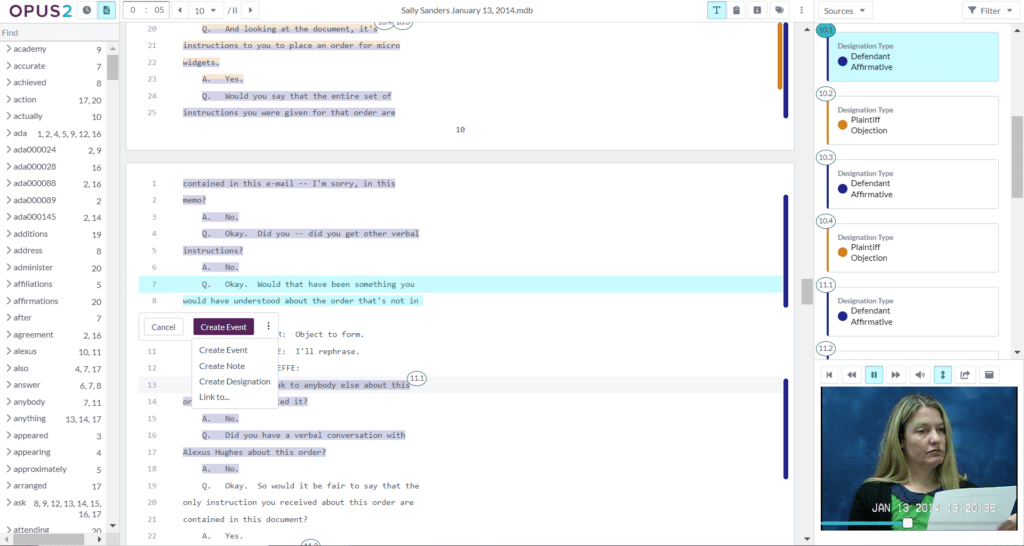
Transcript management software is technology that enables legal teams to digitize and streamline processes related to deposition transcripts. Solutions support key workflows, including:
- Initial transcript review, analysis, and annotation
- Creating deposition summaries
- Connecting facts and events to evidence, events, and entities
- Managing deposition designations
- Clipping and syncing deposition video
Transcript management tools, especially those within litigation case management software may also include embedded AI, further enhancing these workflows. These platforms centralize case management and case collaboration, including transcript management.
How transcript management software works in practice
Modern transcript management software centralizes all case materials in a single environment. This enables litigation teams to:
- Upload and organize transcripts alongside exhibits and documents
- Search across multiple transcripts using keywords or concepts
- Link testimony directly to evidence and case events
- Collaborate in real time across teams
In a recent webinar, Antonio Avant, the director of legal technology at Troutman Emerge described their approach using Opus 2 for transcript management. He pointed out that bringing transcripts into a centralized workspace has been key to their success saying, “We load in all of the transcripts and get everybody in one central location so that all of that work product is maintained in one central place under a organized workflow.”
Challenges of manual transcript management
While most litigation teams use some kind of technology, those without tools designed for transcript management may face challenges. Many rely on PDF editors or word processors to review, highlight, and annotate deposition transcripts. These applications serve basic needs but have significant limitations. Common challenges include:
- Limited collaboration and version control
- Difficulty searching across multiple transcripts
- Inability to connect testimony to evidence and case strategy
- Manual designation processes may introduce errors and inconsistencies
Due to the volume, complexity, and tight deadlines associated with transcript management, manual processes can represent hundreds of hours of work per case—at a significant cost to you and your client.
How does transcript management software work?
Transcript review and deposition summaries
The minute you get the deposition, your team is off to the races. With advanced transcript management tools, members can work simultaneously to begin the review process. Cloud-based legal case management software enables junior associates, litigation support professionals, and paralegals to handle initial reviews in collaboration with partners.
To get a head start, while reviewing the transcript and creating the deposition summary, they can simultaneously:
- Link exhibits and synchronize video
- Tag and organize key sections of testimony by topic or issue
- Link testimony to relevant evidence, documents, events, and characters
- Add comments with follow-up questions and requests to review
Annotation
Transcript management software also enables you to replace the rough deposition transcript with the final version without losing any of your work from the initial review. After receiving the finalized transcript, you’ll need to review key exchanges and make additional notes like:
- Corrections for the errata deposition sheet
- Internal comments with next steps for your team
- Summaries of lengthy sections of testimony
Deposition designations
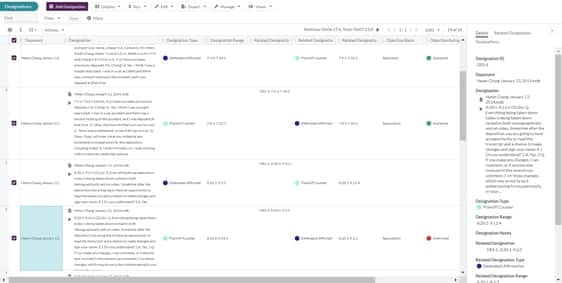
Once you’ve reviewed and annotated the transcript, you’re ready to work on your deposition designations. With deposition transcript management software, it’s incredibly easy to make your designations, exchange them with opposing counsel, and process counter designations as well as objections:
- Highlight your designations and customize formatting to meet court requirements
- Track changes and updates to designations and notes
- Select text precisely with partial-line designations as needed
- See synced video runtime totals as you make your designations
- Create your designations list for exchange automatically
- Import the opposition’s designations to make counter designations, objections, or notes
- Track the court’s ruling to designation objections
Case overview and analysis
The results of your depositions will influence your trial strategy and having everything in one place helps you see the big picture. Case management software with transcript management enables you to view the connections between depositions and the other elements of the case. On a single screen you can:
- Navigate using a transcript word index with key terms and their occurrences
- See the transcript in the same window with related characters, events, and evidence
- View and edit corresponding deposition video clips based on your selections
Reports and exports
Once you’ve gathered your transcripts, reviewed, and annotated them, you’ll need to use that information to create deliverables. With transcript management software, you’re able to quickly search, filter, and create worksheets for your team or to submit to the court.
- Filter transcript testimony from multiple witnesses by topic, keyword, or issue
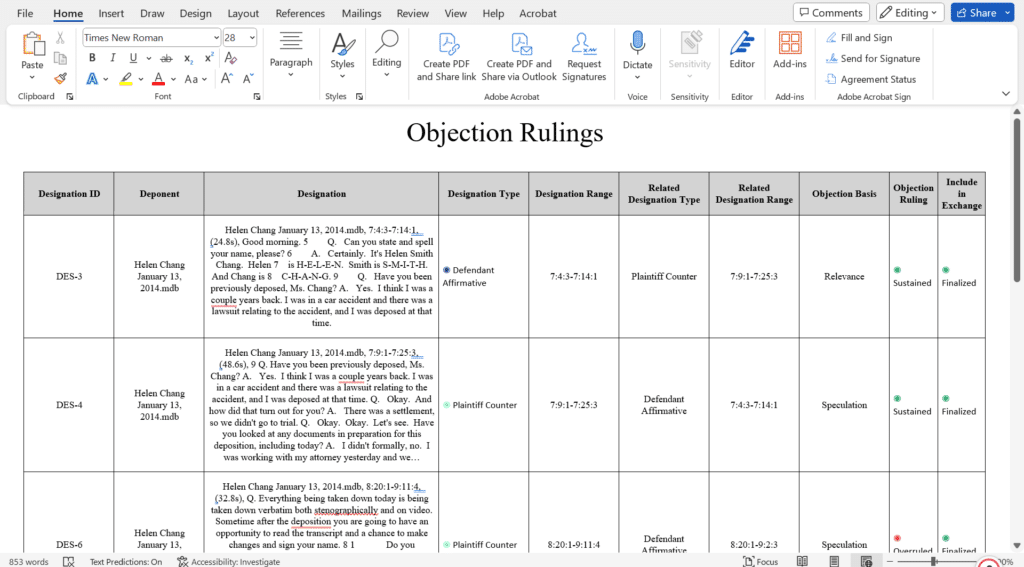
- Quickly build and export objection charts
- Automatically sync and clip deposition videos and transcripts
- Export deposition designation files for trial presentation
- Prepare and export electronic bundles for submission
Top 4 ways to use AI for deposition transcript management
There are a range of practical use cases for AI in transcript management. Applying AI to work that has historically been completed manually can accelerate review, improve accuracy, and surface insights that may otherwise be missed. Importantly, AI is most effective when used to enhance, not replace, legal expertise.
1. Creating deposition summaries with AI
Creating deposition summaries is a great use case for AI in litigation. Traditionally, a skilled paralegal can digest a 75-page transcript in about four hours. However, using AI to create a deposition summary takes only seconds. If you use AI tools embedded into litigation management software, changing the deposition summary format, collaborating with your team, and reviewing summaries is seamless.
In the transcript management webinar (available here on demand), Antonio Avant discussed how Troutman Emerge meets tight deadlines and reduces time spent on summaries with AI. He says when they receive a transcript they use Opus 2 AI to be “able to reduce a week down to a matter of hours or minutes to summarize something. That’s really, really helpful.”
Here’s what AI deposition summaries look like in Opus 2. Associates, paralegals, and litigation support professionals can digest complex transcripts and create a comprehensive deposition summary draft in seconds. From there, you can edit the summary, add annotations, and connect it to other elements of your case quickly. Whether you need a page-line summary, topical summary, narrative summary, or Q&A summary, it only takes a few clicks using AI transcript review tools.

2. AI for transcript analysis
Beyond summarization, AI enables deeper transcript analysis by identifying patterns, themes, and even nuances in testimony that may not be immediately obvious.
For example, AI can help surface tone, sentiment, and linguistic patterns across a witness’s testimony. Caroline Sweeney, the chief knowledge and innovation officer at Dorsey & Whitney, recently shared how her team uses AI in for litigation management. Specifically, she highlighted how they use AI for transcript sentiment analysis. A partner asked her if it could identify when a witness was responding politely on the surface, but with a passive aggressive tone. He referred to this style of speech as “Minnesota nice”—and AI was able to accurately identify its presence in the transcript.
These types of insights can be difficult to detect consistently through manual review, especially across multiple depositions. Understanding underlying sentiment can impact how testimony is interpreted and used in strategy. By applying AI within deposition transcript management software, teams can:
- Identify recurring themes across witnesses
- Surface shifts in tone or credibility indicators
- Highlight language patterns relevant to case strategy
This level of analysis helps litigation teams move beyond surface-level review and develop more informed, nuanced arguments.
3. Using AI to check for inconsistent testimony
One of the most powerful applications of AI in transcript management is identifying inconsistencies across testimony and evidence.
When transcripts are managed within a centralized litigation management platform, AI can analyze the full corpus of case materials, not just individual documents. This allows teams to detect:
- Conflicting statements across depositions
- Gaps between testimony and documentary evidence
- Inconsistencies in timelines or key facts
Using natural language queries, legal teams can quickly investigate these issues without manually cross-referencing multiple transcripts. Kate Jansons Johns, the manager of knowledge and practice support services at Nutter, shared how AI has improved her team’s ability to find information quickly. She said, “Our attorneys are used to crafting search terms—pretty complex Boolean search terms. But now they have an easier way of using natural language searching to surface documents using a chatbot to interrogate the documents pretty quickly.”
This capability is particularly valuable in complex litigation, where large volumes of testimony make it difficult to track discrepancies. AI helps surface these risks earlier, giving teams more time to validate findings and adjust strategy accordingly. As with other use cases, human oversight remains essential. AI can highlight potential inconsistencies, but attorneys must validate and contextualize those findings within the broader case.
4. Getting a case overview with AI
Deposition transcripts often shape the direction of a case—introducing new facts, reframing arguments, or opening additional lines of inquiry. AI enables teams to understand both the big picture and the underlying detail more efficiently. Kate Jansons Johns discussed how her team uses AI to help get to the facts and provide crucial pre-review context, saying “It’s helping the attorneys understand what’s in their documents faster.”
With AI-powered transcript management software, teams can:
- Generate high-level overviews of testimony across multiple witnesses
- Map connections between transcripts, evidence, and case events
- Build and refine case narratives more quickly
- Drill down into specific issues without manually searching thousands of pages
This dual capability enables lawyers to quickly develop an understanding of their case and then dig into the case without having to dig through documents. When used effectively, AI-powered deposition transcript management software enables litigation teams to move from manual review to insight-driven strategy—without sacrificing accuracy or control.
Buying considerations for deposition transcript management software
In addition to the features listed above, there are a few other things to keep in mind when exploring deposition and transcript management solutions as part of a litigation software tech stack.
Look for an all-in-one solution
To get the most value out of your software, all areas of your process should connect seamlessly. Some case management solutions specialize in one area like case chronology, document management, or transcript management. Often, they’ll have robust capabilities in one area, but limited functionality in others. So, make sure the platform you select supports your entire workflow, not just transcript management.
Get an advantage with AI
According to research from Ari Kaplan Advisors, 90 percent of leading litigation teams believe that AI will transform transcript management. And 87 percent believe that AI-enabled case management software offers a competitive advantage. So, when exploring transcript management software, ensure that it offers intuitive AI that will deliver long-term value.
Interested in exploring additional AI use cases? Download this guide: Essential tips for harnessing AI.

Prioritize best-in-class support
User adoption is crucial for any legal technology. Spend time asking questions and reading reviews about user support resources. Implementation, onboarding, and ongoing enablement are three areas to focus on. How will they help you deploy your solution? What training resources do they provide for onboarding and user training? Will users have access to live support and help resources when troubleshooting an issue? A proactive approach to legal tech adoption ensures a strong return on investment.
Explore cost recovery options
Software is an investment, and finding the budget for a new solution may be difficult. As you evaluate best-in-class options, consider adopting a cost recovery approach to help offset the purchase. Getting clients invested in your legal technology is beneficial to both parties. Check out this blog to explore cost recovery for legal technology in more detail.
Additional transcript management resources
Still want to learn more? Check out these helpful resources to explore deposition transcript software, best practices, and processes.
- Article: Deposition summary guide
- Webinar: Advanced transcript management – An inside look at case management software
- Article: Deposition designations guide
- Webinar: Best practices in deposition transcript management
If you have additional questions or would like to see Opus 2 Cases in action, get in touch and request a demo.